
Brands need SEO to efficiently and cost-effectively connect with customers at key points throughout their user journeys. And the sooner they do it, the better off they’ll be.
The need for quality SEO keeps increasing.
Brands that execute an organic strategy the right way are standing out early and often – and it’s more important now than ever, thanks to the emergence of AI and other technological innovations.
Blend those emerging technologies with the tumultuous few years that made up the COVID pandemic – where millions of consumers were pushed online to do their business, make purchases, and stay entertained – and you can begin to scratch the surface of SEO’s importance in marketing’s modern-day ecosystem.
SEO is the most viable, sustainable, and cost-effective way to both understand and reach your customers in key moments that matter.
Doing so not only helps build trust while educating the masses – it also establishes an organic footprint that transcends multiple marketing channels with measurable impact.
But while it will certainly improve a website’s overall searchability and visibility, what other real value does SEO offer for brands willing to commit to legitimate recurring or project-based SEO engagements?
And why does SEO continue to grow into a necessity rather than a luxury?
Organic search is a massive part of most businesses’ website performance and a critical component of the buyer funnel, ultimately getting users to complete a conversion or engagement.
Google owns a significantly larger portion of the search market than competitors like Yahoo, Bing, Baidu, Yandex, DuckDuckGo, and many others.
That’s not to say that all search engines don’t contribute to a brand’s visibility – they do. It’s just that Google owns a considerable portion of the overall search market. Thus, its guidelines are important to follow.
But the remaining part of the market owned by other engines is valuable to brands, too. This is especially true for brands in niche verticals where voice, visual, and vertical search engines play an essential role.
Google, being the most visited website in the world (and specifically in the United States), also happens to be one of the most popular email providers in the world.
YouTube is the second most-used search engine, with at least 2.5 billion people accessing it at least once a month, or 122 million people daily.
We know that a clear majority of the world with access to the internet is visiting Google at least once a day to get information.
Being highly visible as a trusted resource by Google and other search engines will always work in a brand’s favor. Quality SEO and a high-quality website take brands there.
The problem for many brands is that building trust and credibility overnight is impossible – just like in real life. Authority is earned and built over time.
And, with the AI revolution we’ve experienced over the last year showing no signs of slowing down, building real credibility has become even harder to achieve – and even more critical.
Following Google’s E-E-A-T guidelines is vital to ensure successful results when creating content for your audience.
The goal of any experienced SEO professional is to establish a strong foundation of trust and credibility for a client. It helps to have a beautiful website with a clean, effective user experience that represents a quality brand with a loyal customer base – or at least the potential for one.
A brand of this nature would be easily discoverable in search with the right SEO strategy. The more channels you’re comfortable publishing on and partnering with, the more discoverable you will be.
This can also be attributed to being a respected brand offering quality goods or services to customers, being honest and forthcoming with the public, and earning the trust and credibility among peers, competitors, and other stakeholders.
This becomes a lot easier to succeed with when the brand already has trust signals tied to it and its digital properties.
So many varying elements contribute to establishing that authority with search engines like Google. It starts with building that credibility with humans.
In addition to the factors mentioned above, authority is accrued over time as a result of aspects like:
But now, in the age of AI, establishing that authority continues to become even more complicated and difficult to do.
Yet still, doing so the right way will do more for a brand than most other digital campaigns or optimizations.
Establishing a brand as an authority takes patience, effort, and commitment that relies on offering a valuable, quality product or service that allows customers to trust a brand.
Since what seemed like the overnight emergence of AI going mainstream and becoming available at every person’s fingertips, search engine results pages (SERPs) are now more competitive than ever.
Organic real estate keeps shrinking.
Bots, scrapers, and other AI-led technologies are stealing content and regurgitating things they learn along the way, which are often inaccurate or confusing, all while clouding the competitive market with duplicated or plain awful content.
Real SEO – including thorough keyword research, industry analysis, and competitive benchmarking to create high-value content for your customers and loyalists – allows brands to stand apart from the lowly regurgitated spam that floods our SERPs daily.
The challenge of optimizing websites and content for search engines that are relying more on their own AI technologies to enhance the user experience within their platforms than they ever have before is just another layer of complication exemplified by the emergence of AI.
It’s no secret Google’s Search Generative Experience (SGE) hasn’t exactly been the magic touch to take search to the next level. And, in some instances – up to this point – SGE has even taken Google backward in terms of user experience and information retrieval on a boatload of varying topics and queries.
SEO will undoubtedly help brands navigate and distill – and stand out among – the search engine noise that is littered with D-list content and AI-generated mediocrity.
User experience has become every marketer’s number one priority.
Everyone wants better organic rankings and maximum visibility. However, few realize that optimal user experience is a big part of getting there.
Google has learned how to interpret a good or unfavorable user experience, and a positive user experience has become a pivotal element to a website’s success.
Google’s Page Experience Update is something that marketers in all industries will need to adhere to and is part of their longstanding focus on the customer experience.
Customers know what they want. If they can’t find it, there will be a problem with that website holding up against the competition, which will inevitably surpass it by offering the same, or better, content with a better user experience.
We know how much Google values user experience. We see the search engine getting closer to delivering answers to search queries directly on the SERP every day, and it’s been doing it – and expanding its integration – for years.
The intention is to quickly and easily offer users the information they are looking for in fewer clicks.
Quality SEO incorporates a positive user experience, leveraging it to work in a brand’s favor.
It also understands the importance of leveraging Google’s updated on-the-SERP-delivery tactics for high-value content that has garnered significant traffic and engagement for sites in the past, but is now losing significant portions of it to the SERPs themselves.
The mobile-first mindset of humans and search engines has shaped local search into a critical fundamental for most small- and medium-sized businesses.
Local SEO aims to optimize digital properties for a specific vicinity so people can find a business quickly and easily, putting them one step closer to a transaction.
Local optimizations focus on specific neighborhoods, towns, cities, regions, and even states to establish a meaningful medium for a brand’s messaging on a local level.
SEO pros do this by optimizing the brand’s website and its content, including local citations and backlinks, in addition to regional listings relevant to the location and business sector to which a brand belongs.
To promote engagement locally, SEO pros should optimize a brand’s Knowledge Graph panel, its Google Business Profile, and its social media profiles as a start.
There should also be a strong emphasis on user reviews on Google and other third-party sites like Yelp, Home Advisor, and Angie’s List (among others), depending on the industry.
I recommend following the local SEO tips on SEJ here.
Research is becoming a critical element of SEO, and the importance of real-time research is growing.
Using SEO tactics to relay your messaging for good deals, ground-breaking products and services, and the importance and dependability of what you offer customers will be a game-changer.
It will also undoubtedly positively impact the buying cycle when done right.
Brands must be visible where people need them for a worthy connection to be made. Local SEO enhances that visibility and lets potential customers find the answers and the businesses providing those answers.
It’s great to have SEO tactics implemented on a brand’s website and across its digital properties.
Still, if it’s a short-term engagement (budget constraints, etc.) and the site isn’t re-evaluated consistently over time, it will reach a threshold where it can no longer improve because of other hindrances.
Or, it will require such lift that brands will end up spending far more than expected to reach a place they could have otherwise obtained naturally over time through marketing efforts that included SEO.
How the search world evolves (basically at the discretion of Google) requires constant monitoring for changes to stay ahead of the competition and, hopefully, on Page 1.
Being proactive and monitoring for significant algorithm changes will always benefit the brands doing so.
We know Google makes thousands of algorithm changes a year. Fall too far behind, and it will be tough to come back. SEO pros help to ensure this is avoided.
With the always-changing environment that is the World Wide Web, it can be challenging to stay on top of the changes as they occur.
But staying on top of SEO includes being in the loop for the major changes taking place for search.
The AI renaissance has been a clear indication of that.
Knowing the environment of the web, including tactics being used by other local, comparable businesses and competitors, will always be beneficial for those brands.
Observing and measuring what works and what doesn’t only strengthens your brand further as well.
Knowing the search ecosystem will be beneficial 10 out of 10 times.
Sure, it costs money. But all the best things do, right?
SEO is relatively inexpensive in the grand scheme of things, and the payoff will most likely be considerable in terms of a brand’s benefit to the bottom line.
This isn’t a marketing cost; this is an actual business investment.
Exemplary SEO implementation will hold its own for years to come. And, like most things in life, it will only be better with the more attention (and investment) it gets.
Not only is it cost-effective, but it’s scaleable, measurable, and rarely loses value over time.
SEO can (and hopefully does) have a noticeable impact within the first year of taking action – and many of those actions will have a lasting effet.
As the market evolves, it’s best to follow the trends and changes closely.
But even a site that hasn’t had a boatload of intense SEO recommendations implemented will improve from basic SEO best practices being employed on an honest website with a decent user experience.
And the more SEO time, effort, and budget committed to it, the better and longer a website stands to be a worthy contender in its market.
The grass is green where you water it.
While SEO doesn’t offer the same easy-to-calculate return on investment (ROI) as paid search, you can measure almost anything with proper tracking and analytics.
The big problem is connecting the dots on the back end since there is no definitive way to understand the correlation between all actions.
Tracking and attribution technology will continue to improve, which will only help SEO pros and their efforts.
Still, it is worth understanding how specific actions are supposed to affect performance and growth – and hopefully, they do.
Any good SEO pro will aim at those improvements, so connecting the dots should not be a challenge.
Brands also want to know and understand where they were, where they are, and where they’re going in terms of digital performance – especially for SEO when they have a person/company being paid to execute on its behalf.
There’s no better way to show the success of SEO, either.
And we all know the data never lies.
SEO helps build long-term equity for your brand. A good ranking and a favorable placement help elevate your brand’s profile.
People search for news and related items, and having a good SEO and PR strategy means your brand will be seen and likely remembered for something positive.
Providing a good user experience on your website means your messages will be heard, and your products or services will sell.
SEO is no longer a siloed channel, so integrating with content and PR helps with brand reach and awareness alongside other worthwhile results.
High-quality SEO will always find a means of discovering and leveraging new opportunities for brands not just to be discovered but to shine.
And that becomes a lot easier when experienced SEO pros can help distill the millions and millions of websites competing – and flooding – the SERPs daily.
This goes beyond keyword research and website audits.
SEO is also extremely helpful for understanding the voice of your consumers.
From understanding macro market shifts to understanding consumer intent in granular detail, SEO tells us what customers want and need through the data it generates.
SEO data and formats – spoken or word – give us clear signals of intent and user behavior.
It does this in many ways:
Hiring an SEO professional is not always an easy task either. It requires money, time, vision, communication, more time, and some other things that will undoubtedly need to be fixed over the course of time.
Executive SEO on behalf of brands means immersing an SEO team in everything that makes that brand what it is. It’s the only way to truly market something with the passion and understanding that its stakeholders have for it: becoming a stakeholder.
The better a brand is understood, the more opportunities will arise to help it thrive. The same can be said about SEO.
New opportunities with SEO today can come in many ways – from content, digital, and social opportunities to helping with sales, product, and customer service strategies.
SEO is becoming a zero-sum game as zero-click SERPs show the answer directly at the top of a Google search result.
This has only intensified with AI, SGE, Gemini, and more sure-to-come technologies that continue to shape our industry.
Early data showed about 56% of queries in a testing sample triggered SGE automatically directly on the SERP as part of an answer to a specific query in 2023, largely based on the semantics and intent of the query.
SGE results are also still incredibly volatile; sometimes they show up automatically, other times not at all, and other times there’s even an option to use SGE for results or not.
Regardless of that or any speculation on the future, there’s one thing for sure: Zero-click results in searches are winning.
If you’re not on Page 1, you need to be.
There are still too many instances when a user types a search query and can’t find exactly what it’s looking for. And sadly, SGE hasn’t been great at changing that until now.
Consumers will always want products and services online, and brands will always look for the most cost-effective way to connect them with each other.
While the role of SEO may shift and strategies will surely change, new avenues are constantly opening up through different entry points such as voice, apps, wearables, and the Internet of Things (IoT) AI is another prime example, and we can already see its impact greatly.
Outdated SEO tactics aren’t going to work much longer. New organic search opportunities will always arise. SEO helps find the best ways to capitalize on them.
The role of SEO has expanded significantly over the last few years, and it’s only becoming more challenging and expansive in the face of AI.
New technologies are constantly creating new processes and even shortcuts and workarounds that are changing the game, sometimes for the better and sometimes for the worse.
One thing is certain, though: Without giving SEO efforts some significant attention through a brand’s fiscal year, you are doing your business a disservice. Try it and see. Analyze the results. Test some more. Try new things.
Stay up to date with changes and guidelines, and make sure you’re offering unique content that is valuable. And if it’s not originally yours, include proper citation and linking.
SEO will continue to help consumers when in need.
Implementing robust, quality SEO updates on a brand’s website and digital properties will benefit them and their marketing efforts in measurable ways, and the impact will be felt.
There will be challenges, but when done right, there can also be success.
Explore the synergy of seo and ppc for a balanced digital marketing strategy with this guide.
Which is better for business: SEO or PPC?
Which one should you put your resources into?
Truth be told, the answer isn’t one or the other. You need both to succeed!
While both channels focus on increasing traffic and sales, there are key differences between the two.
If you’re not sure where to start, this article will guide you through the differences between SEO and PPC, the pros and cons of each, and how to use both channels together as part of a sound digital marketing strategy.
Before diving into the pros and cons of SEO and PPC, it’s important to define the two.
SEO, or search engine optimization, helps your website rank in non-paid search listings. Typically, the higher rankings you receive, the more traffic you gain to your website.
Organic search results used to be referred to as the “10 blue links.” However, the search engine results page (SERP) has become more sophisticated.
Organic results can be comprised of any or a combination of the following:
Here’s a modern-day example of an organic listing. Notice that the top listing has an original posting date of 2014!
![Search from search for [how to make sourdough bread], Google, October 2023](https://www.searchenginejournal.com/wp-content/uploads/2023/10/sourdough-google-organic-result-exampler-652609417126e-sej.png "SEO vs. PPC: Pros, Cons & Differences 2")
PPC, or pay-per-click, focuses on targeting users with a combination of keyword and audience targeting to display paid placements on the search results page.
Like organic listings, historically, paid search ads were made up of headline and description text.
Today, PPC ads on the SERP can show much more than basic ad copy. Other elements that may be present in a search ad include:
Here’s an example of a current paid search ad listing:
![Search from search for [area rugs], Google, October 2023](https://www.searchenginejournal.com/wp-content/uploads/2023/10/area-rugs-google-ads-example-652608d3d8792-sej.png "SEO vs. PPC: Pros, Cons & Differences 3")
A typical search results page has a combination of both paid ads (PPC) and organic (SEO) listings.
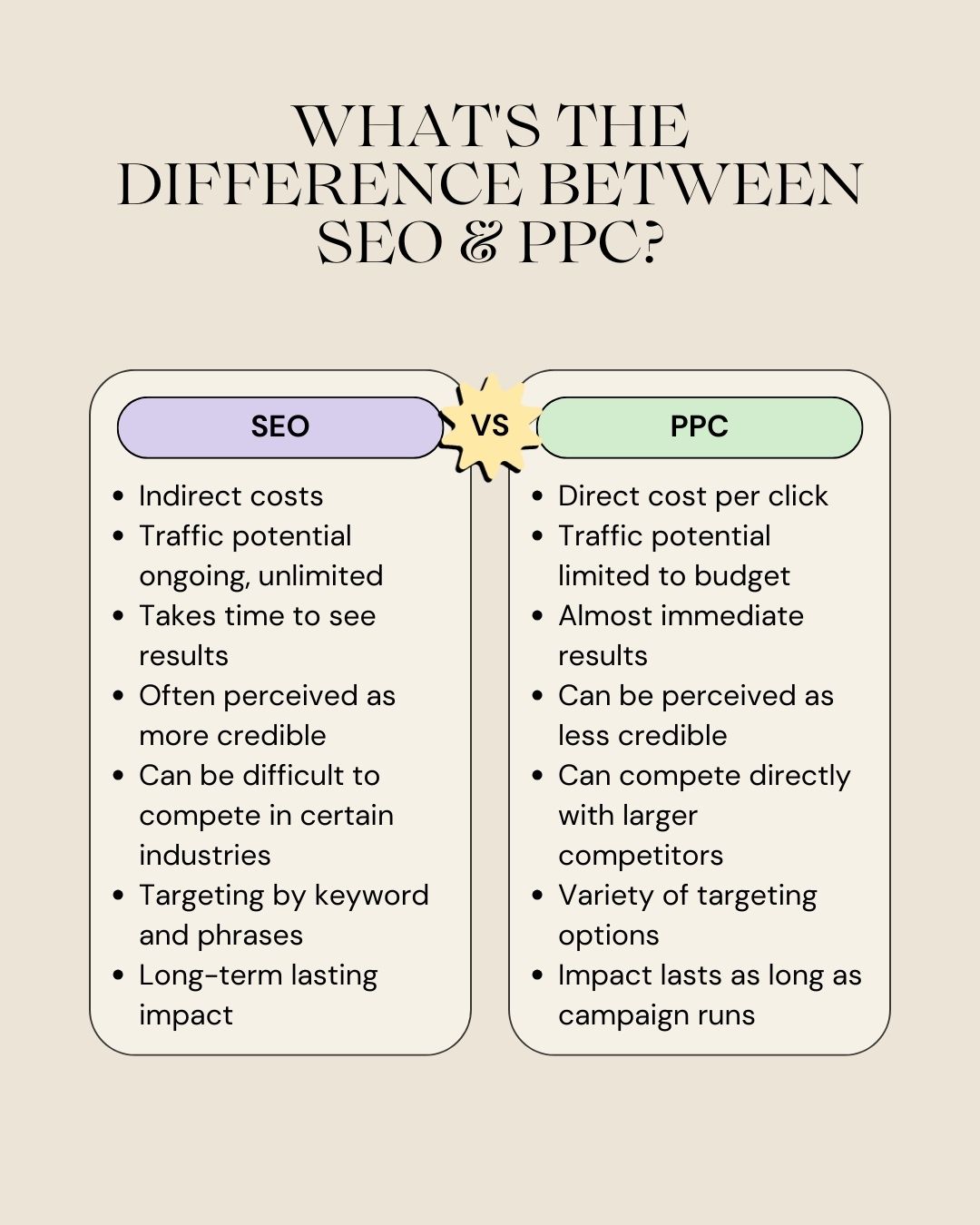
Besides the costs associated with SEO and PPC, there are other key differentiators between the two.
| SEO | PPC |
|---|---|
| Indirect costs | Direct cost per click |
| Traffic potential ongoing, unlimited | Traffic potential limited to budget |
| Takes time to see results | Almost immediate results |
| Often perceived as more credible | Can be perceived as less credible |
| Can be difficult to compete in certain industries | Can compete directly with larger competitors |
| Targeting by keywords and phrases | Variety of targeting options |
| Long-term lasting impact | Impact lasts as long as campaign runs |
Investing in SEO has many business advantages but also has its downfalls.
Let’s take a look at some of the pros of SEO.
Even though you can reap massive rewards through good SEO, it doesn’t come without its pitfalls.
Defining key goals and measurement protocols from the start makes it easier to determine if your SEO efforts are paying off or if pivots are necessary.
Before deciding to invest in PPC, make sure to weigh the advantages and disadvantages.
Here are some of the key pros of PPC:
Like all other channels, PPC has its downfalls.
You should have a better idea of the pros and cons of both SEO and PPC.
Now it’s time to answer the burning question: SEO or PPC?
Google confirmed that the November 2023 core update – the fourth core update this year – has completed rolling out. The update started on November 2, 2023, only a couple of weeks after the October 2023 core update, which started rolling out on October 5 and was completed on October 19.
The November core update finished on November 28, 2023, 26 days after it started to roll out.
What we saw. This update, like most previous core updates, felt big in terms of the number of sites that saw ranking volatility and the complaints from SEOs about the rollout. This November core update started off fast and had a very big impact right away. I covered what some of the SEOs noticed early on at the Search Engine Roundtable.
Overlapping update. Keep in mind that the Google November 2023 reviews update started on Wednesday, November 8, 2023 and is still in progress. So those two updates were happening at the same time, but the impact of each update was experienced at different times by sites.
Why we care. Google algorithm updates are critical for all brands, businesses, and organizations to be aware of because they can impact how your site performs in search results. Any change in rankings from a core update – positive or negative – can impact your organic traffic, conversions and revenue.
Knowing when Google makes these updates enables site owners to know if traffic fluctuations resulted from a change to the site or something Google changed with its ranking algorithm.
What to do if you are hit. Google has given advice on what to consider if you are negatively impacted by a core update in the past:
Previous core updates. Here’s a timeline and our coverage of recent core updates:
4th Welcome to WordPress. This is your first post. Edit or delete it, then start writing! In Google Analytics, the “Default Channel Grouping” is a predefined set of rules that categorizes incoming traffic into various channels. The “Session Default Channel Grouping” specifically refers to how Google Analytics assigns channels to sessions by default. Here are the main default channel groupings in Google Analytics:
The “Session Default Channel Grouping” ensures that each session is categorized into one of these default channels based on the source and medium of the traffic. It provides a quick overview of how users are reaching your website, making it easier to analyze and understand the effectiveness of your marketing channels. It’s worth noting that you can customize these default channel groupings or create your own custom channel groupings to align with your specific business needs and marketing strategies. Customization allows for a more granular analysis of your data based on your unique goals and objectives. In Google Analytics, the “Default Channel Grouping” is a predefined set of rules that categorizes incoming traffic into various channels. The “Session Default Channel Grouping” specifically refers to how Google Analytics assigns channels to sessions by default. Here are the main default channel groupings in Google Analytics:
The “Session Default Channel Grouping” ensures that each session is categorized into one of these default channels based on the source and medium of the traffic. It provides a quick overview of how users are reaching your website, making it easier to analyze and understand the effectiveness of your marketing channels. It’s worth noting that you can customize these default channel groupings or create your own custom channel groupings to align with your specific business needs and marketing strategies. Customization allows for a more granular analysis of your data based on your unique goals and objectives. In Google Analytics, the “Default Channel Grouping” is a predefined set of rules that categorizes incoming traffic into various channels. The “Session Default Channel Grouping” specifically refers to how Google Analytics assigns channels to sessions by default. Here are the main default channel groupings in Google Analytics:
The “Session Default Channel Grouping” ensures that each session is categorized into one of these default channels based on the source and medium of the traffic. It provides a quick overview of how users are reaching your website, making it easier to analyze and understand the effectiveness of your marketing channels. It’s worth noting that you can customize these default channel groupings or create your own custom channel groupings to align with your specific business needs and marketing strategies. Customization allows for a more granular analysis of your data based on your unique goals and objectives.
<h2 class="font-bold text-lg lg:text-2xl">Google Ads</h2>
<p><?php the_field('email_address','option'); ?></p>barryhughesweb@gmail.com
3rd Welcome to WordPress. This is your first post. Edit or delete it, then start writing!
In Google Analytics, the “Default Channel Grouping” is a predefined set of rules that categorizes incoming traffic into various channels. The “Session Default Channel Grouping” specifically refers to how Google Analytics assigns channels to sessions by default.
Here are the main default channel groupings in Google Analytics:
Direct: Traffic from users who directly typed your website URL into their browser or used a bookmark.
Organic Search: Traffic from search engines like Google, Bing, etc.
Paid Search: Traffic from paid advertising campaigns, typically from platforms like Google Ads.
Referral: Traffic from other websites that link to your site.
Social: Traffic from social media platforms.
Email: Traffic from links in emails.
Affiliates: Traffic from affiliate marketing efforts.
Display: Traffic from display advertising, such as banner ads.
Other Advertising: Traffic from advertising sources not covered by Paid Search, Display, or Social.
Other: This catch-all category includes traffic that doesn’t fit into any of the above groupings.
The “Session Default Channel Grouping” ensures that each session is categorized into one of these default channels based on the source and medium of the traffic. It provides a quick overview of how users are reaching your website, making it easier to analyze and understand the effectiveness of your marketing channels.
It’s worth noting that you can customize these default channel groupings or create your own custom channel groupings to align with your specific business needs and marketing strategies. Customization allows for a more granular analysis of your data based on your unique goals and objectives.
In Google Analytics, the “Default Channel Grouping” is a predefined set of rules that categorizes incoming traffic into various channels. The “Session Default Channel Grouping” specifically refers to how Google Analytics assigns channels to sessions by default.
Here are the main default channel groupings in Google Analytics:
Direct: Traffic from users who directly typed your website URL into their browser or used a bookmark.
Organic Search: Traffic from search engines like Google, Bing, etc.
Paid Search: Traffic from paid advertising campaigns, typically from platforms like Google Ads.
Referral: Traffic from other websites that link to your site.
Social: Traffic from social media platforms.
Email: Traffic from links in emails.
Affiliates: Traffic from affiliate marketing efforts.
Display: Traffic from display advertising, such as banner ads.
Other Advertising: Traffic from advertising sources not covered by Paid Search, Display, or Social.
Other: This catch-all category includes traffic that doesn’t fit into any of the above groupings.
The “Session Default Channel Grouping” ensures that each session is categorized into one of these default channels based on the source and medium of the traffic. It provides a quick overview of how users are reaching your website, making it easier to analyze and understand the effectiveness of your marketing channels.
It’s worth noting that you can customize these default channel groupings or create your own custom channel groupings to align with your specific business needs and marketing strategies. Customization allows for a more granular analysis of your data based on your unique goals and objectives.
In Google Analytics, the “Default Channel Grouping” is a predefined set of rules that categorizes incoming traffic into various channels. The “Session Default Channel Grouping” specifically refers to how Google Analytics assigns channels to sessions by default.
Here are the main default channel groupings in Google Analytics:
Direct: Traffic from users who directly typed your website URL into their browser or used a bookmark.
Organic Search: Traffic from search engines like Google, Bing, etc.
Paid Search: Traffic from paid advertising campaigns, typically from platforms like Google Ads.
Referral: Traffic from other websites that link to your site.
Social: Traffic from social media platforms.
Email: Traffic from links in emails.
Affiliates: Traffic from affiliate marketing efforts.
Display: Traffic from display advertising, such as banner ads.
Other Advertising: Traffic from advertising sources not covered by Paid Search, Display, or Social.
Other: This catch-all category includes traffic that doesn’t fit into any of the above groupings.
The “Session Default Channel Grouping” ensures that each session is categorized into one of these default channels based on the source and medium of the traffic. It provides a quick overview of how users are reaching your website, making it easier to analyze and understand the effectiveness of your marketing channels.
It’s worth noting that you can customize these default channel groupings or create your own custom channel groupings to align with your specific business needs and marketing strategies. Customization allows for a more granular analysis of your data based on your unique goals and objectives.
4th Welcome to WordPress. This is your first post. Edit or delete it, then start writing!
In Google Analytics, the “Default Channel Grouping” is a predefined set of rules that categorizes incoming traffic into various channels. The “Session Default Channel Grouping” specifically refers to how Google Analytics assigns channels to sessions by default.
Here are the main default channel groupings in Google Analytics:
Direct: Traffic from users who directly typed your website URL into their browser or used a bookmark.
Organic Search: Traffic from search engines like Google, Bing, etc.
Paid Search: Traffic from paid advertising campaigns, typically from platforms like Google Ads.
Referral: Traffic from other websites that link to your site.
Social: Traffic from social media platforms.
Email: Traffic from links in emails.
Affiliates: Traffic from affiliate marketing efforts.
Display: Traffic from display advertising, such as banner ads.
Other Advertising: Traffic from advertising sources not covered by Paid Search, Display, or Social.
Other: This catch-all category includes traffic that doesn’t fit into any of the above groupings.
The “Session Default Channel Grouping” ensures that each session is categorized into one of these default channels based on the source and medium of the traffic. It provides a quick overview of how users are reaching your website, making it easier to analyze and understand the effectiveness of your marketing channels.
It’s worth noting that you can customize these default channel groupings or create your own custom channel groupings to align with your specific business needs and marketing strategies. Customization allows for a more granular analysis of your data based on your unique goals and objectives.
In Google Analytics, the “Default Channel Grouping” is a predefined set of rules that categorizes incoming traffic into various channels. The “Session Default Channel Grouping” specifically refers to how Google Analytics assigns channels to sessions by default.
Here are the main default channel groupings in Google Analytics:
Direct: Traffic from users who directly typed your website URL into their browser or used a bookmark.
Organic Search: Traffic from search engines like Google, Bing, etc.
Paid Search: Traffic from paid advertising campaigns, typically from platforms like Google Ads.
Referral: Traffic from other websites that link to your site.
Social: Traffic from social media platforms.
Email: Traffic from links in emails.
Affiliates: Traffic from affiliate marketing efforts.
Display: Traffic from display advertising, such as banner ads.
Other Advertising: Traffic from advertising sources not covered by Paid Search, Display, or Social.
Other: This catch-all category includes traffic that doesn’t fit into any of the above groupings.
The “Session Default Channel Grouping” ensures that each session is categorized into one of these default channels based on the source and medium of the traffic. It provides a quick overview of how users are reaching your website, making it easier to analyze and understand the effectiveness of your marketing channels.
It’s worth noting that you can customize these default channel groupings or create your own custom channel groupings to align with your specific business needs and marketing strategies. Customization allows for a more granular analysis of your data based on your unique goals and objectives.
In Google Analytics, the “Default Channel Grouping” is a predefined set of rules that categorizes incoming traffic into various channels. The “Session Default Channel Grouping” specifically refers to how Google Analytics assigns channels to sessions by default.
Here are the main default channel groupings in Google Analytics:
Direct: Traffic from users who directly typed your website URL into their browser or used a bookmark.
Organic Search: Traffic from search engines like Google, Bing, etc.
Paid Search: Traffic from paid advertising campaigns, typically from platforms like Google Ads.
Referral: Traffic from other websites that link to your site.
Social: Traffic from social media platforms.
Email: Traffic from links in emails.
Affiliates: Traffic from affiliate marketing efforts.
Display: Traffic from display advertising, such as banner ads.
Other Advertising: Traffic from advertising sources not covered by Paid Search, Display, or Social.
Other: This catch-all category includes traffic that doesn’t fit into any of the above groupings.
The “Session Default Channel Grouping” ensures that each session is categorized into one of these default channels based on the source and medium of the traffic. It provides a quick overview of how users are reaching your website, making it easier to analyze and understand the effectiveness of your marketing channels.
It’s worth noting that you can customize these default channel groupings or create your own custom channel groupings to align with your specific business needs and marketing strategies. Customization allows for a more granular analysis of your data based on your unique goals and objectives.
2nd Welcome to WordPress. This is your first post. Edit or delete it, then start writing!
4th Welcome to WordPress. This is your first post. Edit or delete it, then start writing!
In Google Analytics, the “Default Channel Grouping” is a predefined set of rules that categorizes incoming traffic into various channels. The “Session Default Channel Grouping” specifically refers to how Google Analytics assigns channels to sessions by default.
Here are the main default channel groupings in Google Analytics:
Direct: Traffic from users who directly typed your website URL into their browser or used a bookmark.
Organic Search: Traffic from search engines like Google, Bing, etc.
Paid Search: Traffic from paid advertising campaigns, typically from platforms like Google Ads.
Referral: Traffic from other websites that link to your site.
Social: Traffic from social media platforms.
Email: Traffic from links in emails.
Affiliates: Traffic from affiliate marketing efforts.
Display: Traffic from display advertising, such as banner ads.
Other Advertising: Traffic from advertising sources not covered by Paid Search, Display, or Social.
Other: This catch-all category includes traffic that doesn’t fit into any of the above groupings.
The “Session Default Channel Grouping” ensures that each session is categorized into one of these default channels based on the source and medium of the traffic. It provides a quick overview of how users are reaching your website, making it easier to analyze and understand the effectiveness of your marketing channels.
It’s worth noting that you can customize these default channel groupings or create your own custom channel groupings to align with your specific business needs and marketing strategies. Customization allows for a more granular analysis of your data based on your unique goals and objectives.
In Google Analytics, the “Default Channel Grouping” is a predefined set of rules that categorizes incoming traffic into various channels. The “Session Default Channel Grouping” specifically refers to how Google Analytics assigns channels to sessions by default.
Here are the main default channel groupings in Google Analytics:
Direct: Traffic from users who directly typed your website URL into their browser or used a bookmark.
Organic Search: Traffic from search engines like Google, Bing, etc.
Paid Search: Traffic from paid advertising campaigns, typically from platforms like Google Ads.
Referral: Traffic from other websites that link to your site.
Social: Traffic from social media platforms.
Email: Traffic from links in emails.
Affiliates: Traffic from affiliate marketing efforts.
Display: Traffic from display advertising, such as banner ads.
Other Advertising: Traffic from advertising sources not covered by Paid Search, Display, or Social.
Other: This catch-all category includes traffic that doesn’t fit into any of the above groupings.
The “Session Default Channel Grouping” ensures that each session is categorized into one of these default channels based on the source and medium of the traffic. It provides a quick overview of how users are reaching your website, making it easier to analyze and understand the effectiveness of your marketing channels.
It’s worth noting that you can customize these default channel groupings or create your own custom channel groupings to align with your specific business needs and marketing strategies. Customization allows for a more granular analysis of your data based on your unique goals and objectives.
In Google Analytics, the “Default Channel Grouping” is a predefined set of rules that categorizes incoming traffic into various channels. The “Session Default Channel Grouping” specifically refers to how Google Analytics assigns channels to sessions by default.
Here are the main default channel groupings in Google Analytics:
Direct: Traffic from users who directly typed your website URL into their browser or used a bookmark.
Organic Search: Traffic from search engines like Google, Bing, etc.
Paid Search: Traffic from paid advertising campaigns, typically from platforms like Google Ads.
Referral: Traffic from other websites that link to your site.
Social: Traffic from social media platforms.
Email: Traffic from links in emails.
Affiliates: Traffic from affiliate marketing efforts.
Display: Traffic from display advertising, such as banner ads.
Other Advertising: Traffic from advertising sources not covered by Paid Search, Display, or Social.
Other: This catch-all category includes traffic that doesn’t fit into any of the above groupings.
The “Session Default Channel Grouping” ensures that each session is categorized into one of these default channels based on the source and medium of the traffic. It provides a quick overview of how users are reaching your website, making it easier to analyze and understand the effectiveness of your marketing channels.
It’s worth noting that you can customize these default channel groupings or create your own custom channel groupings to align with your specific business needs and marketing strategies. Customization allows for a more granular analysis of your data based on your unique goals and objectives.
4th Welcome to WordPress. This is your first post. Edit or delete it, then start writing!
In Google Analytics, the “Default Channel Grouping” is a predefined set of rules that categorizes incoming traffic into various channels. The “Session Default Channel Grouping” specifically refers to how Google Analytics assigns channels to sessions by default.
Here are the main default channel groupings in Google Analytics:
Direct: Traffic from users who directly typed your website URL into their browser or used a bookmark.
Organic Search: Traffic from search engines like Google, Bing, etc.
Paid Search: Traffic from paid advertising campaigns, typically from platforms like Google Ads.
Referral: Traffic from other websites that link to your site.
Social: Traffic from social media platforms.
Email: Traffic from links in emails.
Welcome to WordPress. This is your first post. Edit or delete it, then start writing!
4th Welcome to WordPress. This is your first post. Edit or delete it, then start writing!
In Google Analytics, the “Default Channel Grouping” is a predefined set of rules that categorizes incoming traffic into various channels. The “Session Default Channel Grouping” specifically refers to how Google Analytics assigns channels to sessions by default.
Here are the main default channel groupings in Google Analytics:
Direct: Traffic from users who directly typed your website URL into their browser or used a bookmark.
Organic Search: Traffic from search engines like Google, Bing, etc.
Paid Search: Traffic from paid advertising campaigns, typically from platforms like Google Ads.
Referral: Traffic from other websites that link to your site.
Social: Traffic from social media platforms.
Email: Traffic from links in emails.
Affiliates: Traffic from affiliate marketing efforts.
Display: Traffic from display advertising, such as banner ads.
Other Advertising: Traffic from advertising sources not covered by Paid Search, Display, or Social.
Other: This catch-all category includes traffic that doesn’t fit into any of the above groupings.
The “Session Default Channel Grouping” ensures that each session is categorized into one of these default channels based on the source and medium of the traffic. It provides a quick overview of how users are reaching your website, making it easier to analyze and understand the effectiveness of your marketing channels.
It’s worth noting that you can customize these default channel groupings or create your own custom channel groupings to align with your specific business needs and marketing strategies. Customization allows for a more granular analysis of your data based on your unique goals and objectives.
In Google Analytics, the “Default Channel Grouping” is a predefined set of rules that categorizes incoming traffic into various channels. The “Session Default Channel Grouping” specifically refers to how Google Analytics assigns channels to sessions by default.
Here are the main default channel groupings in Google Analytics:
Direct: Traffic from users who directly typed your website URL into their browser or used a bookmark.
Organic Search: Traffic from search engines like Google, Bing, etc.
Paid Search: Traffic from paid advertising campaigns, typically from platforms like Google Ads.
Referral: Traffic from other websites that link to your site.
Social: Traffic from social media platforms.
Email: Traffic from links in emails.
Affiliates: Traffic from affiliate marketing efforts.
Display: Traffic from display advertising, such as banner ads.
Other Advertising: Traffic from advertising sources not covered by Paid Search, Display, or Social.
Other: This catch-all category includes traffic that doesn’t fit into any of the above groupings.
The “Session Default Channel Grouping” ensures that each session is categorized into one of these default channels based on the source and medium of the traffic. It provides a quick overview of how users are reaching your website, making it easier to analyze and understand the effectiveness of your marketing channels.
It’s worth noting that you can customize these default channel groupings or create your own custom channel groupings to align with your specific business needs and marketing strategies. Customization allows for a more granular analysis of your data based on your unique goals and objectives.
In Google Analytics, the “Default Channel Grouping” is a predefined set of rules that categorizes incoming traffic into various channels. The “Session Default Channel Grouping” specifically refers to how Google Analytics assigns channels to sessions by default.
Here are the main default channel groupings in Google Analytics:
Direct: Traffic from users who directly typed your website URL into their browser or used a bookmark.
Organic Search: Traffic from search engines like Google, Bing, etc.
Paid Search: Traffic from paid advertising campaigns, typically from platforms like Google Ads.
Referral: Traffic from other websites that link to your site.
Social: Traffic from social media platforms.
Email: Traffic from links in emails.
Affiliates: Traffic from affiliate marketing efforts.
Display: Traffic from display advertising, such as banner ads.
Other Advertising: Traffic from advertising sources not covered by Paid Search, Display, or Social.
Other: This catch-all category includes traffic that doesn’t fit into any of the above groupings.
The “Session Default Channel Grouping” ensures that each session is categorized into one of these default channels based on the source and medium of the traffic. It provides a quick overview of how users are reaching your website, making it easier to analyze and understand the effectiveness of your marketing channels.
It’s worth noting that you can customize these default channel groupings or create your own custom channel groupings to align with your specific business needs and marketing strategies. Customization allows for a more granular analysis of your data based on your unique goals and objectives.
4th Welcome to WordPress. This is your first post. Edit or delete it, then start writing!
In Google Analytics, the “Default Channel Grouping” is a predefined set of rules that categorizes incoming traffic into various channels. The “Session Default Channel Grouping” specifically refers to how Google Analytics assigns channels to sessions by default.
Here are the main default channel groupings in Google Analytics:
Direct: Traffic from users who directly typed your website URL into their browser or used a bookmark.
Organic Search: Traffic from search engines like Google, Bing, etc.
Paid Search: Traffic from paid advertising campaigns, typically from platforms like Google Ads.
Referral: Traffic from other websites that link to your site.
Social: Traffic from social media platforms.
Email: Traffic from links in emails.
Affiliates: Traffic from affiliate marketing efforts.
Display: Traffic from display advertising, such as banner ads.
Other Advertising: Traffic from advertising sources not covered by Paid Search, Display, or Social.
Other: This catch-all category includes traffic that doesn’t fit into any of the above groupings.
The “Session Default Channel Grouping” ensures that each session is categorized into one of these default channels based on the source and medium of the traffic. It provides a quick overview of how users are reaching your website, making it easier to analyze and understand the effectiveness of your marketing channels.
It’s worth noting that you can customize these default channel groupings or create your own custom channel groupings to align with your specific business needs and marketing strategies. Customization allows for a more granular analysis of your data based on your unique goals and objectives.
In Google Analytics, the “Default Channel Grouping” is a predefined set of rules that categorizes incoming traffic into various channels. The “Session Default Channel Grouping” specifically refers to how Google Analytics assigns channels to sessions by default.
Here are the main default channel groupings in Google Analytics:
Direct: Traffic from users who directly typed your website URL into their browser or used a bookmark.
Organic Search: Traffic from search engines like Google, Bing, etc.
Paid Search: Traffic from paid advertising campaigns, typically from platforms like Google Ads.
Referral: Traffic from other websites that link to your site.
Social: Traffic from social media platforms.
Email: Traffic from links in emails.
Affiliates: Traffic from affiliate marketing efforts.
Display: Traffic from display advertising, such as banner ads.
Other Advertising: Traffic from advertising sources not covered by Paid Search, Display, or Social.
Other: This catch-all category includes traffic that doesn’t fit into any of the above groupings.
The “Session Default Channel Grouping” ensures that each session is categorized into one of these default channels based on the source and medium of the traffic. It provides a quick overview of how users are reaching your website, making it easier to analyze and understand the effectiveness of your marketing channels.
It’s worth noting that you can customize these default channel groupings or create your own custom channel groupings to align with your specific business needs and marketing strategies. Customization allows for a more granular analysis of your data based on your unique goals and objectives.
In Google Analytics, the “Default Channel Grouping” is a predefined set of rules that categorizes incoming traffic into various channels. The “Session Default Channel Grouping” specifically refers to how Google Analytics assigns channels to sessions by default.
Here are the main default channel groupings in Google Analytics:
Direct: Traffic from users who directly typed your website URL into their browser or used a bookmark.
Organic Search: Traffic from search engines like Google, Bing, etc.